I'm back on Emacs nearly 2 years later! Might as well start blogging there…
The only real thing you have to do after setting things up is to create your posts with a .org extention. If you used to run hugo new content/posts/article.md, now you should run hugo new content/posts/article.org.
Frontmatter
You'll have to create a file in your archetypes folder (do not modify the default.md file like I did at first!) called default.org. This is where you'll put your template frontmatter. I don't use a lot of frontmatter for this blog, so mine looks fairly simple:
1
2
3
4
#+TITLE: {{ replace .File.ContentBaseName "-" " " | title }}
#+DATE: {{ .Date }}
#+DRAFT: false
#+CATEGORIES[]:
The 4th line just means you can list your categories. Instead of doing categories = ["category1", "category2"], now I do #+CATEGORIES[]: category1 category2.
Shortcodes
I still find elisp incredibly confusing to work with (so my code will be pretty wonky) but there is a really cool built-in function that we can use. What we'll essentially do is create a keyboard shortcut to insert a shortcode. I currently use 4 shortcodes, so I'll write functions for those but it should be pretty easy to adapt it to your own. Also, I should mention right about now that I'm using Doom Emacs.
First, open up your configuration file. We'll write functions for each of the shortcodes we want. Your own shortcodes will go into the quotes following the insert keyword.
 1
 2
 3
 4
 5
 6
 7
 8
 9
10
11
12
13
14
15
16
17
18
19
20
21
22
23
24
25
(defun hugo-insert-code-shortcode ()
  (interactive)
  (insert "{{< codecaption title=\"\" lang=\"\" >}}\n\n{{</ codecaption >}}")
  (backward-char 35)
  (evil-insert 1)
  )

(defun hugo-insert-image-shortcode ()
  (interactive)
  (insert "{{< imgcap title=\"\" src=\"\" >}}")
  (backward-char 12)
  (evil-insert 1)
  )

(defun hugo-insert-toc-shortcode ()
  (interactive)
  (insert "{{< toc >}}")
  )

(defun hugo-insert-status-shortcode ()
  (interactive)
  (insert "{{< status status=\"\" >}}")
  (backward-char 5)
  (evil-insert 1)
  )
Lines 3 and 4 of each function exist to move the cursor to the first parameter of each shortcode and enter insert mode (since I have a Vim package installed). You'll have to manually count how many characters to you want to backtrack in each case. Fun!
Now, we'll bind them to keys. Something I really like about Emacs is how you can organise your keybindings! Here, I'll be assigning all of my Hugo shortcodes to the broader category of SPC 1 (i.e. press the spacebar followed by 1). From there, I can press a key I'll assign to execute the functions we wrote above. This is what this looks:
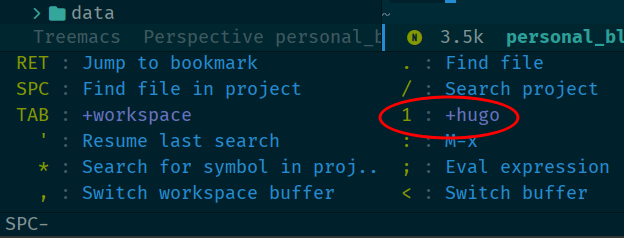 After pressing SPC
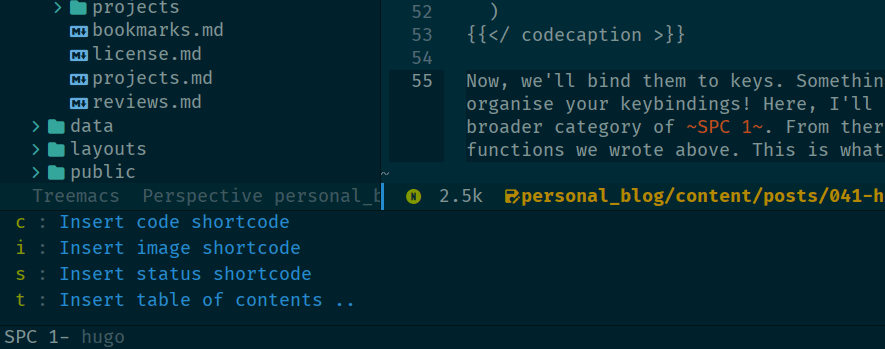 Possible keys to press
For example, to insert an image shortcode, I'll press SPC 1 i.
Here's the assignment of keybindings:
 1
 2
 3
 4
 5
 6
 7
 8
 9
10
11
12
13
14
15
16
17
18
19
(map! :leader
      (:prefix ("1" . "hugo")
        :desc "Insert code shortcode"
        "c" #'hugo-insert-code-shortcode))

(map! :leader
      (:prefix ("1" . "hugo")
        :desc "Insert image shortcode"
        "i" #'hugo-insert-image-shortcode))

(map! :leader
      (:prefix ("1" . "hugo")
        :desc "Insert table of contents shortcode"
        "t" #'hugo-insert-toc-shortcode))

(map! :leader
      (:prefix ("1" . "hugo")
        :desc "Insert status shortcode"
        "s" #'hugo-insert-status-shortcode))
For now, that's it! I'll be sure to update this page if I figure out any more useful tidbits about this subject matter.